UFT MTK New Security Tool 2026 Free Download
Introduction
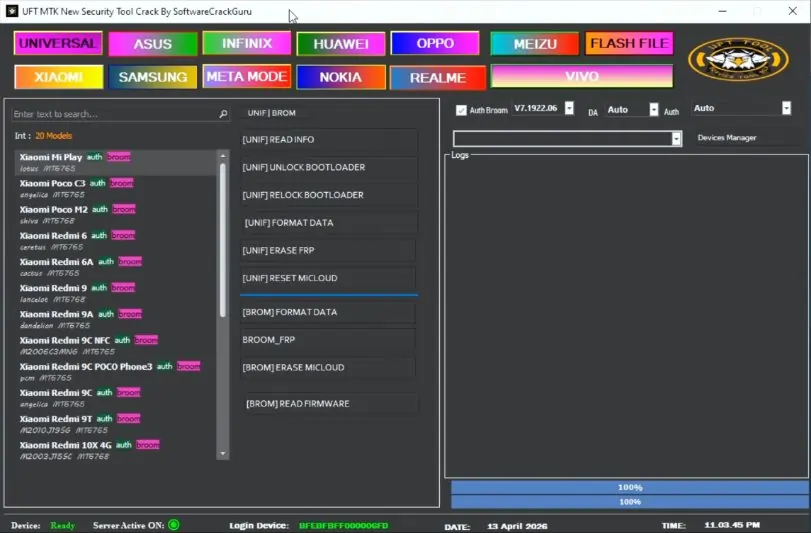
In the world of smartphone repairing, MediaTek (MTK) devices are everywhere. However, with new security patches, bypassing FRP (Factory Reset Protection) or removing screen locks has become harder. The UFT MTK New Security Tool has emerged as a powerful, free solution for technicians and DIY users to manage MTK security protocols without needing expensive hardware or dongles.
Key Features of UFT MTK New Security Tool
- Auth Bypass: Skip the authentication requirement for flashing firmware.
- FRP Reset: Remove Google Account locks in one click.
- Format/Factory Reset: Easily wipe data to remove pattern, PIN, or password locks.
- Mi Cloud Bypass: Specifically designed to help Xiaomi MTK users.
- Safe Format: Clear data without losing the system integrity.
- Bootloader Unlock: Simplified process for unlocking MTK bootloaders.
- VROM/Preloader Support: Works with the latest security updates.
How to Use the Tool
- Download: Get the UFT MTK New Security Tool zip file from a trusted source.
- Drivers: Ensure you have the MTK USB Drivers and LibUSB installed on your PC.
- Extract: Extract the tool using WinRAR or 7-Zip.
- Run: Open the UFT_MTK.exe as an Administrator.
- Connect: Select the desired function (e.g., Erase FRP), power off your phone, and connect it to the PC while holding Volume Up + Down.
- Done: The tool will automatically detect the device and complete the process.
Read Also:
- MaAnt Maintenance Assistant 2026 Free Download
- All Box&Dongle Activations here
- POCO M4 Pro 5G (evergreen) ENG Firmware Free Download
FAQ,
Q1: Is the UFT MTK New Security Tool free?
A: Yes, the tool is currently available as a free-to-use utility. Unlike many other professional tools, it does not require a physical dongle or a yearly subscription.
Q2: Does it support the latest Android 13 or 14 devices?
A: Yes, the UFT MTK New Security Tool is updated to support newer security patches, provided the device uses a MediaTek chipset.
Q3: Do I need to disable my Antivirus?
A: Like most service tools, your antivirus might flag it as a “false positive.” It is recommended to disable your antivirus or Windows Defender temporarily during the extraction and installation process.
Q4: Which brands are supported?
A: It supports almost all brands using MediaTek CPUs, including Xiaomi, Oppo, Vivo, Realme, Samsung (MTK models), Infinix, and Tecno.
Q5: Is there any risk of hard-bricking my phone?
A: While the tool is safe, any software that modifies system partitions carries a small risk. Always ensure your phone has at least 30% battery and use a high-quality USB cable.