GSMCode Pro Tool v8.0 2026 Free Download
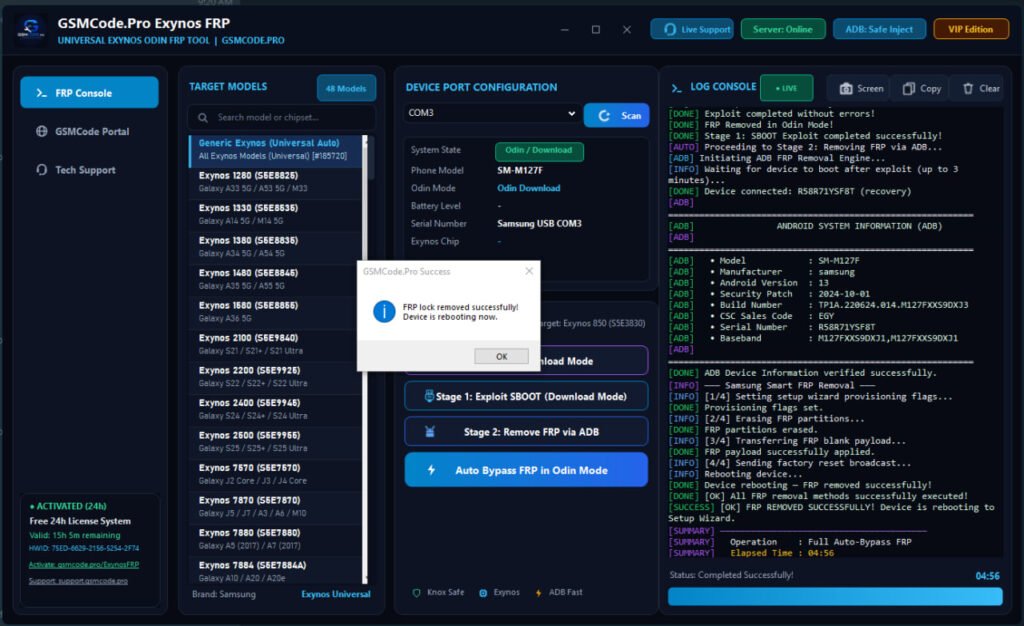
Managing factory reset protection (FRP) and partition locks on Android and iOS devices can be challenging for mobile technicians. The GSMCode Pro tool (including modules like the Exynos FRP Tool and AIO Bypass suite) provides a streamlined solution for servicing smartphones.
What is GSMCode Pro Tool?
The GSMCode Pro software suite contains utility tools designed for smartphone servicing, flashing, and FRP bypassing. Known for its efficiency with Samsung Exynos chipsets, MediaTek (MTK), Qualcomm devices, and Apple iOS bypass operations, this tool allows technicians to interact directly with device partitions to unlock security restrictions.
┌──────────────────────────────────────────────────────────┐
│              GSMCode Pro Utility Engine                  │
├──────────────────────────┬───────────────────────────────┤
│ Samsung Exynos Module    │ Enable ADB / Odin FRP Wipe    │
│ MediaTek (MTK) Meta Mode │ Partitioning & Flash Unlock   │
│ iOS Ramdisk / Checkm8    │ MDM & iCloud Bypass Suite     │
└──────────────────────────┴───────────────────────────────┘
Key Features
- One-Click FRP Removal: Instantly bypass Google Account verification on Samsung devices running Android 14, 15, and 16.
- Odin Mode ADB Activation: Enables USB Debugging directly through Download/Odin Mode without requiring disassembling.
- Auto-Detect Chipsets: Automatically detects Exynos, MediaTek, and Qualcomm processors upon connection.
- iOS Bypass Support: Offers Ramdisk and Checkm8 exploit tools for MDM bypass and hello-screen activation.
- Offline Operation: Essential routines run locally via low-level serial communication without requiring heavy server dependencies.
Technical Specifications
| Feature | Details |
| Supported OS | Windows 10 / Windows 11 (64-bit) |
| Compatible CPUs | Exynos, MediaTek, Qualcomm, Apple A-Series |
| Connection Type | Standard USB-C / Micro-USB cable |
| Prerequisites | .NET Framework 4.7.1+, Samsung & MTK USB Drivers |
| License Type | Free Community Utilities / Premium Extensions |
Step-by-Step Installation Guide
1.Download and Extract Archives:Turn off real-time antivirus protection temporarily.
Download the installer zip archive using the official link provided below. Extract the package to your desktop using WinRAR or 7-Zip.
2.Install USB Drivers:Required for device recognition.
Run the included driver setup (QcomMtk Driver and Samsung USB Driver) to ensure your PC communicates properly with devices in Odin or META mode.
3.Launch GSMCode Executable:Run with Administrator privileges.
Right-click GSMCode_Pro.exe or Exynos_FRP.exe and select Run as Administrator.
4.Connect Device and Service:
Connect the target phone via USB cable. Select Auto Detect to recognize the chipset, choose your operation (e.g., Enable ADB & Remove FRP), and click Start.
Also Read:
How to Download GSMCode Pro Tool
You can access official downloads and utility packages directly from the main service portal:
- Official Portal: GSMCode.Pro Download Directory
Frequently Asked Questions (FAQ)
Is GSMCode Pro completely free?
The utility provides fully free tools (such as the Exynos FRP Tool v8.0), while specialized source code packages and hardware-specific activation modules are available as paid licenses.
Does this tool require hardware dongles?
No. Standard USB cables are sufficient for running FRP and flashing operations with this software.
Why does my antivirus flag the file?
Servicing utilities use low-level serial communication and exploit drivers (like LibUSB or Checkm8). Antivirus programs may flag these as false positives. Always verify signatures or add an exception before running.
Disclaimer: Unlocking tools should strictly be used for authorized mobile repairs, diagnostics, and personal device ownership recovery.
GSMCode Pro Tool v8.0 2026 Free Download
Free Download