KS Tool V4.6 Unlocking and Flashing Tool 2026 Free Download
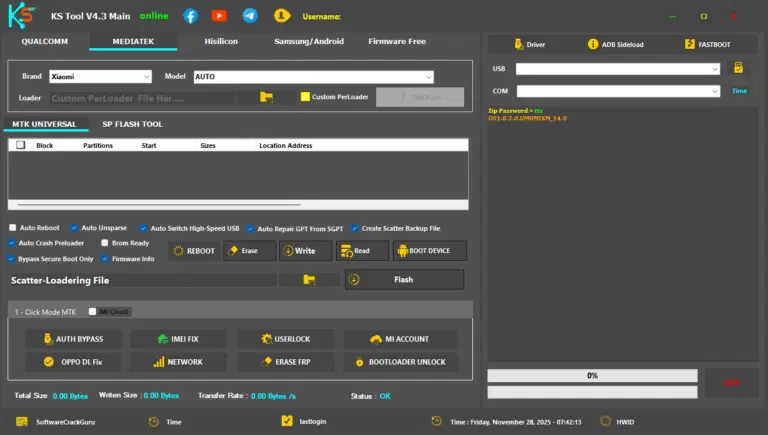
If you are a mobile technician or a smartphone enthusiast, you know how frustrating it is to deal with forgotten passwords, locked FRP (Factory Reset Protection) screens, or corrupted firmware. Finding a reliable, all-in-one software that doesn’t cost a fortune can be a challenge.
Enter KS Tool V4.6. This powerful utility has become a favourite in the GSM community for its versatility and ease of use. In this guide, we’ll explore what makes this tool special, its key features, and how you can download it to streamline your repair workflow.
What is KS Tool V4.6?
KS Tool V4.6 is a multi-functional service tool designed for Android smartphones. Whether you are dealing with a device powered by MediaTek (MTK), Qualcomm, or Spreadtrum (SPD) chipsets, this tool provides a comprehensive suite of features to bypass locks and flash firmware.
Unlike many professional tools that require expensive hardware dongles, KS Tool V4.6 is often available as a standalone software, making it accessible for beginners and pros alike. It supports a wide range of popular brands, including Xiaomi, Samsung, Oppo, Vivo, Realme, and Huawei.
Key Features of KS Tool V4.6
The reason KS Tool V4.6 stands out is its massive feature list. Here are some of the most used functions:
1. FRP Bypass (Google Lock)
One of the most common issues today is the FRP lock. KS Tool allows you to remove Google account verification on almost any Android device with just one click.
2. Mi Account Unlock
Xiaomi users often struggle with the “This device is locked” screen. This tool can bypass or disable the Mi Account and even fix “Relock” issues once you connect to Wi-Fi.
3. Factory Reset & Pattern Removal
Forgot your pattern, PIN, or password? You can perform a safe format (to keep your data on some models) or a hard factory reset to get back into the device.
4. Auth Bypass
For modern MTK devices, you usually need an authorised account to flash them. KS Tool V4.6 includes an Auth Bypass feature that disables the security protocol, allowing you to flash the phone without a paid account.
5. Bootloader Management
Easily unlock or relock the bootloader for various brands, which is essential for installing custom ROMs or rooting.
Supported Brands & CPUs
- Samsung: FRP removal (MTP and Download mode).
- Xiaomi/Redmi: Mi Account bypass, Fastboot to EDL, and Bootloader unlock.
- Oppo/Vivo/Realme: Safe format and Demo removal.
- Huawei: ID bypass and flashing via USB COM 1.0.
- Chipsets: MediaTek (MTK), Qualcomm Snapdragon, and SPD.
How to Install and Use KS Tool V4.6
- Download: Get the KS Tool V4.6 setup file from a trusted source.
- Disable Antivirus: Since this is a system utility tool, some antivirus programs might flag it as a “false positive.” It is recommended to disable your Windows Defender before extracting.
- Install Drivers: Ensure you have the LibUSB, MTK Drivers, and Qualcomm USB Drivers installed on your PC.
- Run as Admin: Right-click the setup and select “Run as Administrator.”
- Connect Device: Select the desired function (e.g., Erase FRP), power off your phone, and connect it to the PC while holding the Volume Up + Down buttons (for MTK/Qualcomm).
Also Read:
- UFT MTK New Security Tool 2026 Free Download
- Motorola Moto G86 5G MDM File Free Download
- All Box&Dongle Activations here
Why Choose KS Tool V4.6?
- User-Friendly Interface: You don’t need to be a coding expert. The GUI is clean and simple.
- No Dongle Required: It saves you money on hardware.
- Regular Updates: Version 4.6 includes the latest security patch fixes for 2024 and 2025 devices.
- Fast Execution: Most operations take less than 60 seconds.
FAQ,
1. Is KS Tool V4.6 free to use?
Yes, KS Tool V4.6 is generally shared as a free-to-download tool for the community, though some specialised versions may require a login.
2. Does it support the latest Android 13 and 14?
Yes, the developers have updated the scripts in V4.6 to handle FRP and factory resets on many devices running Android 13 and 14.
3. Can I use it to unlock Samsung FRP?
Absolutely. KS Tool V4.6 has a dedicated Samsung module that works via the *#0*# emergency dialer method or through Download Mode.
4. Is it safe for my computer?
As long as you download it from a reputable GSM forum or site, it is safe. However, always use it in a controlled environment and keep a backup of your phone’s data, as flashing can result in data loss.
5. Do I need an internet connection?
Some features work offline, but for the most stable experience and to check for server-based updates, an internet connection is recommended.
Conclusion
KS Tool V4.6 is a “must-have” in your digital toolkit if you deal with smartphone software repairs. Its ability to handle FRP, Mi Accounts, and Auth Bypass for free makes it an incredibly valuable asset.
Ready to get started? Search for a trusted download link for KS Tool V4.6 today and take control of your smartphone’s software!
Disclaimer: This blog is for educational purposes only. Unlocking or flashing devices should only be done on hardware you own or have permission to service. We are not responsible for any damage to your device.