AMFTool Ver 1.3.5 Free Download
If you are in the mobile repair industry, you know that having the right software can be the difference between a successful fix and a bricked device. One name gaining significant traction among technicians is AMF Tool.
With the release of AMFTool Ver 1.3.5, many users are looking for a reliable way to download and use this powerful utility. In this guide, we’ll dive into what’s new in this version, why it’s a must-have for your toolkit, and how to get started.
What is AMFTool?
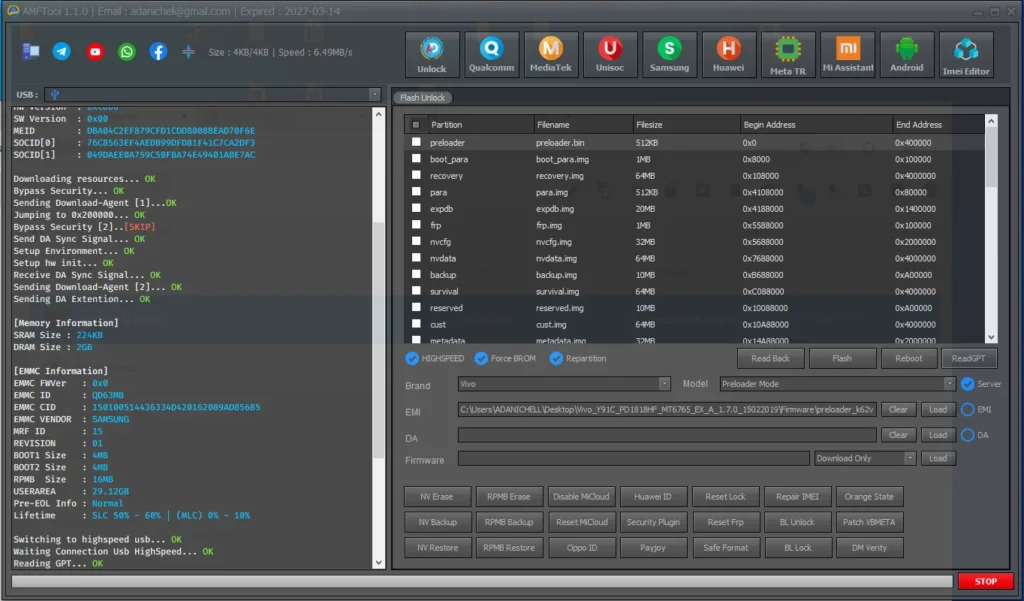
AMFTool is a specialised service software designed for mobile devices, particularly those running on MediaTek (MTK) and Qualcomm chipsets. It is widely used for tasks such as flashing firmware, removing FRP (Factory Reset Protection), unlocking bootloaders, and repairing IMEI or security data.
The tool is famous for its “one-click” functionality, making complex mobile servicing tasks accessible even for those who aren’t software experts.
New Features in AMFTool Ver 1.3.5
The 1.3.5 update isn’t just a minor patch; it brings several stability improvements and expanded device support. Here are the highlights:
- Expanded Model Support: Improved compatibility for the latest Oppo, Realme, and Xiaomi models.
- Enhanced MTK Meta Mode: More stable connections for devices using MediaTek processors.
- FRP Bypass Optimisation: Faster removal of Google account locks on Android 12 and 13.
- Bug Fixes: Resolved previous issues where the tool would crash during high-speed flashing.
- User Interface Updates: A cleaner, more intuitive layout for faster navigation.
Why Technicians Prefer AMFTool
While there are many tools on the market, AMF Tool stands out because of its lightweight size and the fact that it doesn’t require heavy hardware dongles for basic operations. It is a cost-effective solution for small repair shops looking to expand their service capabilities without investing thousands in expensive equipment.
How to Install AMF Tool Ver 1.3.5
- Download: Locate a trusted source for the AMF Tool setup file.
- Disable Antivirus: Like most mobile service tools, your antivirus might flag it as a “False Positive.” It is recommended to temporarily disable your real-time protection.
- Extract Files: Use WinRAR or 7-Zip to extract the folder.
- Install Drivers: Ensure you have the latest MTK and Qualcomm USB drivers installed on your PC.
- Run as Administrator: Right-click the .exe file and select “Run as Administrator” to ensure the tool has the necessary permissions.
Read Also:
- MOBILedit Forensic All Brand Support Free Download
- All Box&Dongle Activation here
- Motorola G77 XT2621-3 Naples MDM File Free
FAQ,
1. Is AMFTool Ver 1.3.5 free to use?
Yes, version 1.3.5 is generally released as a free-to-download utility for the community. However, some advanced functions may require specific credits or a registered account, depending on the developer’s current policy.
2. Is AMFTool safe for my PC?
As long as you download the tool from a reputable mobile repair forum or official community link, it is safe. Always scan downloaded files and run them in a controlled environment if you are unsure.
3. Does it work on Windows 11?
Yes, AMFTool is fully compatible with Windows 7, 10, and 11 (both 32-bit and 64-bit architectures).
4. Which brands does AMFTool support?
The tool primarily focuses on brands using MediaTek and Qualcomm chips, including Oppo, Vivo, Realme, Xiaomi, Huawei, and Samsung (specific models).
5. Do I need a hardware dongle for AMFTool?
No, one of the biggest advantages of AMFTool is that it is a software-based solution, meaning you don’t need a physical USB dongle to run the program.
Conclusion
AMFTool Ver 1.3.5 continues to be a top-tier choice for mobile technicians worldwide. Its ease of use, combined with powerful flashing and unlocking capabilities, makes it an essential part of any repair workflow.
Disclaimer: This guide is for educational purposes only. Always ensure you have the permission of the device owner before performing software repairs or bypassing security features.
Are you using AMFTool for your repairs? Let us know your experience in the comments below!