FRPFILE A12+ Activator V1.3.5 Free Download (Latest Version)
Getting locked out of your iPhone or iPad due to an Activation Lock is a frustrating experience. Whether you forgot your Apple ID credentials or bought a second-hand device that wasn’t properly reset, you need a reliable solution to get back into your phone.
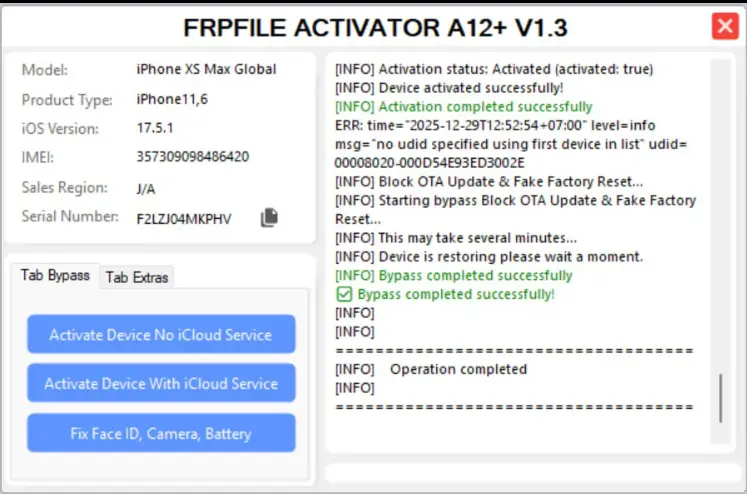
One of the most talked-about tools in the mobile repair community right now is the FRPFILE A12+ Activator. In this guide, we’ll take a closer look at the latest V1.3.5 update, its features, and how you can download it for free.
What is FRPFILE A12+ Activator?
The FRPFILE A12+ Activator is a specialised software utility designed to bypass iCloud Activation Locks and MDM (Mobile Device Management) profiles on Apple devices.
What makes this tool unique is its focus on A12+ chips. While many free tools only support older devices (like the iPhone X and below), this activator is specifically optimised to handle newer hardware architectures, including the iPhone XR, XS, 11, 12, 13, and even some 14 series models, depending on the firmware version.
Key Features of V1.3.5
The developers behind FRPFILE are known for frequent updates to keep up with Apple’s security patches. Here is what’s new in V1.3.5:
- Support for A12-A16 Bionic Chips: Enhanced stability for newer devices.
- iOS 15, 16, and iOS 17 Compatibility: Works with the latest mainstream iOS versions.
- One-Click Bypass: A simplified user interface that allows even beginners to bypass the Hello Screen.
- MDM Bypass: Easily remove corporate management profiles without needing admin credentials.
- No Jailbreak Required (In some modes): Unlike older tools that required complex jailbreaking, V1.3.5 uses advanced exploits that simplify the process.
- Fixed Driver Issues: Better compatibility with Windows 10 and 11.
How to Use FRPFILE A12+ Activator
Disclaimer: This tool should only be used on devices you legally own. Using these tools for illegal purposes is strictly prohibited.
- Download and Install: Download the FRPFILE A12+ Activator zip file from a trusted source (link below).
- Disable Antivirus: Because this software uses system exploits, your antivirus might flag it as a “False Positive.” It is recommended to disable real-time protection temporarily.
- Connect Your Device: Use a high-quality USB cable to connect your iPhone or iPad to your PC.
- Install Drivers: Ensure you have the latest version of iTunes and 3uTools installed so your PC recognises the device.
- Run the Tool: Open the Activator as an Administrator.
- Follow the on-Screen Instructions: Click “Check Device” to see if your phone is supported. If it is, click “Start Bypass” and wait for the process to complete.
Read Also:
- TMT TOOL PRO V3.0.0.3 Latest Free Download
- All Box&Dongel Activations here
- Xiaomi 17 Pro Max (popsicle) Eng Firmware Android 16 Free Download
Download FRPFILE A12+ Activator V1.3.5
FAQ,
Is the FRPFILE A12+ Activator really free?
Yes, the FRPFILE team often releases free versions of their tools. However, some advanced features (like signal support on certain models) may require a registered serial number.
Does this bypass include Signal/SIM support?
Bypassing the Activation Lock on A12+ devices is complex. Version 1.3.5 typically supports “Wifi Only” bypass for the Hello screen. If you require SIM/Signal support, you may need to check if your specific device and iOS version are supported for “Full Signal” bypass.
Will I lose my data?
Yes. Bypassing an Activation Lock involves a factory reset of the device. All data previously on the phone will be erased.
Can I restart my phone after using the activator?
V1.3.5 is a “Tethered/Untethered” hybrid. In most cases, the bypass is untethered, meaning you can reboot your device without losing the bypass. However, it is always recommended not to update the iOS version or factory reset the device after the bypass is complete.
What are the requirements for the PC?
The tool is currently designed for Windows (7, 8, 10, or 11). You will also need a stable internet connection and Apple mobile device drivers installed.
Conclusion
The FRPFILE A12+ Activator is a powerful ally for anyone dealing with locked Apple devices. With the V1.3.5 update, the process is faster and more reliable than ever. If you have an A12+ device sitting in a drawer because of a forgotten password, this tool might be exactly what you need to bring it back to life.
Have questions? Drop a comment below, and we’ll try to help you out!