MDM FIX PRO Free Login 2025 Download
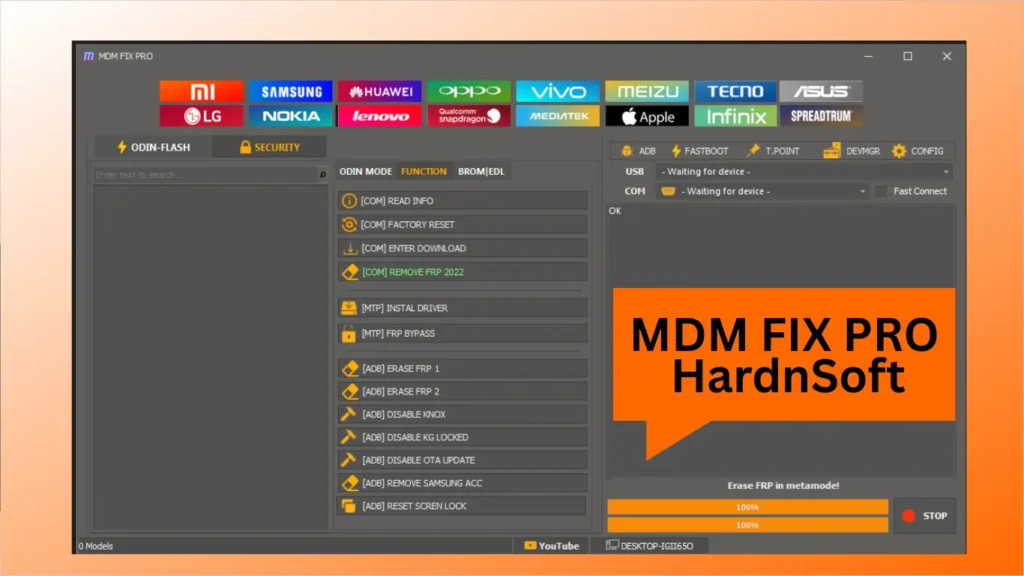
MDM FIX PRO Model fetching is disabled by the developer, so model names may not load automatically.
Use the tool only on devices you own or have written consent to repair. Success varies by model, firmware, and patch level.
MDM FIX PRO SUPPORT:
- Multi-brand tool covering Qualcomm, MTK, Samsung, Xiaomi, PAC, and iOS workflows in one panel
- Qualcomm area: EDL flash, FRP erase, factory reset, QCN and NV backup/restore
- MTK corner: old/meta/universal modes, FRP, format, unlock, flash and IMEI tools
- Samsung tab: Odin mode flash, ADB/MTP FRP bypass, MiCloud reset and sideload
- Xiaomi support: Mi Flash, MiCloud reset, sideload and boot repair
- iOS area: Ramdisk creation, DFU fix, passcode and activation-related utilities
- PAC operations: FRP, flash and IMEI DIAG for SPD/Unisoc devices
- ADB/Fastboot: device info, reboot options, factory reset, bootloader repair and slot switch
- Built-in DIAG tools for IMEI read/write and network calibration
- New clean interface with brand shortcuts, live logs, and quick connect options
MDM FIX PRO Installation & Activation:
- Run MDM FIX PRO UNLOCK TOOL Beta.exe as administrator
- Extract Unlock_Tool_MDM_FIX_Login.rar
- Run the patch EXE → click Activate Now → wait for “Patch Activated”
- Launch tool → enter username + password → tick Remember Me → click Login
- Wait for “Login successful – Retrieving user info”
Troubleshooting
- Run both main and patch files as Administrator
- Turn off antivirus during patch use
- Close any old MDM FIX PRO background process
- Reboot the PC if the login still fails
Read Also: