RDPowerPlus Tool V19.8 Free Download
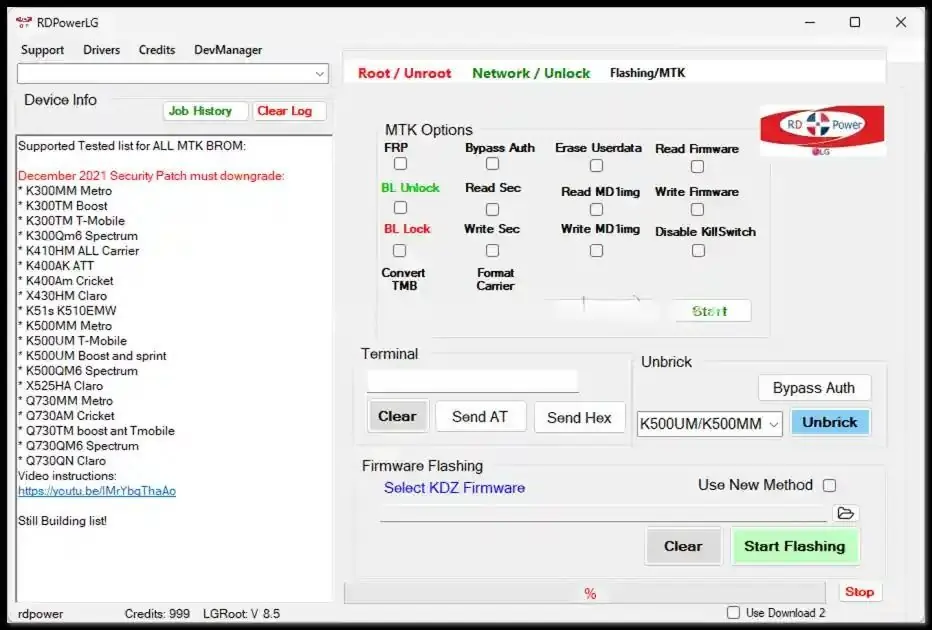
If you are a mobile technician or a DIY Android enthusiast, you know that having the right software can be the difference between a paperweight and a fully functioning smartphone. Today, we’re diving deep into the latest update of one of the most versatile utility tools in the GSM market: RDPowerPlus Tool V19.8.
In this guide, we’ll explore what makes this version special, its key features, and how to get your hands on the RDPowerPlus Tool V19.8 for free.
What is the RDPowerPlus Tool V19.8?
RDPowerPlus Tool V19.8 is a comprehensive Windows-based software designed to help users bypass Factory Reset Protection (FRP), flash firmware, and unlock various Android devices. Whether you are dealing with a forgotten pattern lock on an Oppo, a Google account lock on a Samsung, or a bootloader issue on a Xiaomi, this tool provides a “one-click” solution for many complex repairs.
The V19.8 update brings improved stability and expanded support for the latest security patches released in late 2024 and early 2025.
Key Features of RDPowerPlus Tool V19.8
Why should you choose this tool over others? Here are the standout features:
- Universal FRP Bypass: Easily remove Google account locks on Samsung, Huawei, Vivo, and more.
- Xiaomi Mi Cloud Unlock: Specifically optimised for bypassing Mi Cloud locks on Redmi and Poco devices.
- Oppo/Realme Meta Mode: Perform factory resets and unlock patterns without losing data in some models.
- MTK & Qualcomm Support: Broad compatibility with MediaTek (MTK) and Snapdragon chipsets.
- Flash Firmware: A built-in module to flash official firmware files safely.
- User-Friendly Interface: Unlike many command-line tools, RDPowerPlus offers a clean, visual dashboard.
How to Install RDPowerPlus Tool V19.8
Before proceeding with the RDPowerPlus Tool V19.8 free download, ensure your PC meets these requirements:
- OS: Windows 7, 8, 10, or 11 (64-bit recommended).
- Drivers: Ensure you have the latest MTK and Qualcomm USB drivers installed.
- Antivirus: You may need to temporarily disable Windows Defender, as many GSM tools are flagged as “False Positives” due to their nature as system-file modifiers.
Step-by-Step Guide:
- Download the ZIP file from a trusted source.
- Extract the folder using WinRAR or 7-Zip.
- Run the RDPowerPlus_V19.8_Setup.exe as an administrator.
- Follow the on-screen instructions to complete the installation.
- Launch the tool and connect your device in the required mode (Fastboot, EDL, or ADB).
Also Read:
- KS Tool V4.6 Unlocking and Flashing Tool 2026 Free Download
- All Box&Dongle Activation here
- Realme GT Neo2 5G Flash File Free Download
FAQ,
1. Is RDPowerPlus Tool V19.8 really free?
Yes, version V19.8 is available as a free-to-use utility for the community. However, always ensure you are downloading it from a reputable tech blog to avoid malware.
2. Does this tool support the latest Android 14 or 15 devices?
RDPowerPlus Tool V19.8 has been updated to support many devices running Android 14. Support for Android 15 is currently in the beta phase for specific brands like Samsung and Pixel.
3. Is it safe to use?
The tool itself is safe for your hardware if used correctly. However, since it interacts with system-level partitions, always back up your data before performing a factory reset or flashing firmware.
4. What should I do if the tool doesn’t detect my phone?
Most connection issues are caused by faulty USB cables or missing drivers. Check your Device Manager to ensure the “MTK Port” or “Qualcomm HS-USB QDLoader 9008” is visible.
5. What is the password for the RDPowerPlus Tool V19.8 zip file?
Most distributors use a standard password like 123, password, or the name of the website you downloaded it from. If you downloaded it from a major GSM forum, check the bottom of their download page.
Conclusion
The RDPowerPlus Tool V19.8 remains a powerhouse in the mobile servicing industry. Its ability to handle multiple brands and complex locking mechanisms makes it a must-have for your digital toolkit. By following the guide above, you can successfully manage the RDPowerPlus Tool V19.8 free download and get back to unlocking devices in no time.
Disclaimer: This article is for educational purposes only. Unlocking or bypassing security on a device you do not own is illegal. Use this tool responsibly on your own devices or for legitimate repair business purposes.