VG Mobile Service Tool V5.1 Latest Free Download
If you are a mobile repair technician or a tech enthusiast, you already know how frustrating it can be to deal with locked smartphones, forgotten passwords, or stubborn FRP (Factory Reset Protection) locks. To fix these issues, you need reliable software. This is where the VG Mobile Service Tool comes to the rescue.
In this article, we will talk about the latest VG Mobile Service Tool V5.1, its amazing features, and how you can download it for free to make your smartphone repair tasks easier than ever.
What is the VG Mobile Service Tool?
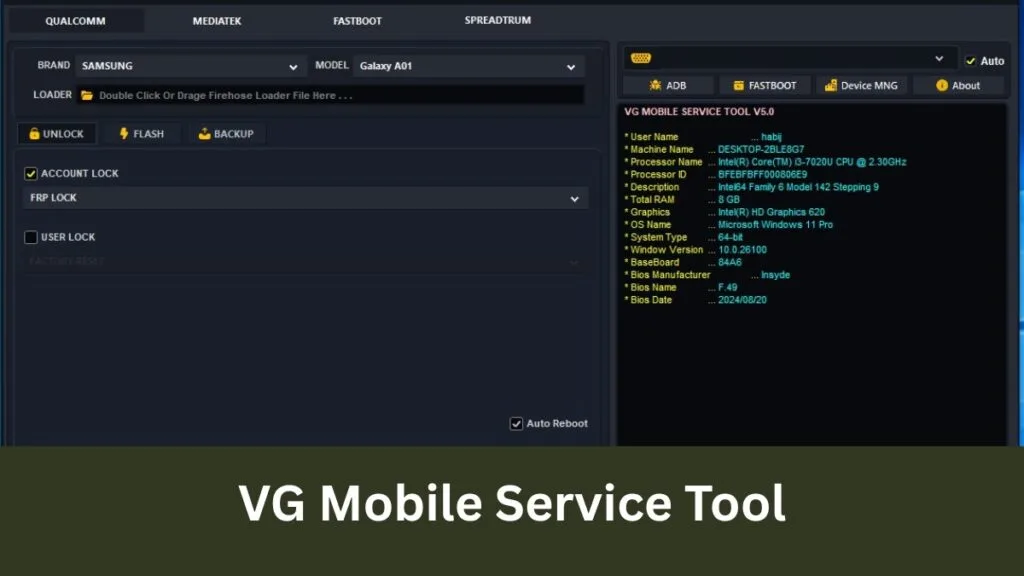
The VG Mobile Service Tool is a powerful, free Windows-based utility software designed to help users repair and service Android smartphones. Whether you are dealing with a device powered by MediaTek (MTK), Qualcomm, or SPD chipsets, this tool provides a one-stop solution for a variety of software-related problems.
With the release of Version 5.1, the developers have added support for more device models and fixed previous bugs, making it faster and much more stable.
Key Features of VG Mobile Service Tool V5.1
Why is everyone in the mobile repair community talking about this software? Here are the top features that make the VG Mobile Service Tool a must-have:
- One-Click FRP Bypass: Bypassing the Google Account verification (FRP) after a hard reset is now just a matter of a single click.
- Remove Screen Locks: Forgot your PIN, pattern, or password? This tool can safely remove screen locks, allowing you to regain access to the device.
- Flash Firmware: You can easily flash stock ROMs to fix dead phones, boot loop issues, or software glitches.
- Format/Factory Reset: Perform a deep factory reset on stubborn devices that won’t format through regular recovery mode.
- Broad Chipset Support: It seamlessly works with major processors, including Qualcomm, MTK (MediaTek), and Spreadtrum (SPD).
- Read Device Info: Instantly read the complete hardware and software information of any connected smartphone.
How to Download and Install VG Mobile Service Tool V5.1
Installing the VG Mobile Service Tool is very simple. Just follow these easy steps to get it running on your PC:
Step 1: Disable Anti-Virus
Before downloading, temporarily disable your Windows Defender or third-party antivirus. Since this is a system-level unlocking tool, antivirus software often flags it as a false positive.
Step 2: Download the File
Click on the download link to get the latest V5.1 ZIP file.
Step 3: Extract the File
Use WinRAR or 7-Zip to extract the downloaded folder to your desktop.
Step 4: Install USB Drivers
For the tool to detect your phone, ensure you have the correct USB drivers (MTK/Qualcomm/SPD) installed on your computer.
Step 5: Run the Setup
Open the extracted folder, right-click on the VG Mobile Service Tool.exe file, and select “Run as Administrator.” You are now ready to repair!
Pros and Cons
Pros:
- 100% Free to use (No dongle or box required).
- Very simple and user-friendly interface.
- Supports a massive list of Android brands (Oppo, Vivo, Xiaomi, Samsung, etc.).
Cons:
- Requires a Windows PC to run.
- You must install the correct USB drivers manually for it to work.
Read Also:
- Prime Tool X V8.8 Latest Version 2026
- Motorola Edge 40 Neo Remove FRP File
- All Box&Dongle Activation here
FAQ
Q1: Is the VG Mobile Service Tool completely free to use?
Yes, the VG Mobile Service Tool is a freeware program. You do not need to buy any premium activation, dongle, or credit to use its features.
Q2: Does this tool support all Android phones?
It supports a vast majority of Android devices running on MediaTek, Qualcomm, and SPD chipsets. However, for the very latest security patches, you may need to wait for future updates.
Q3: Will unlocking my phone with this tool delete my personal data?
Yes. Whenever you remove a screen lock, PIN, or perform a factory reset using this tool, all user data (photos, contacts, apps) on the internal storage will be erased.
Q4: Why is my PC blocking the installation?
Unlocking tools interact deeply with device software, which can cause Windows Defender or antivirus programs to detect them as threats (false positives). Simply disable your antivirus temporarily during installation and use.
Q5: Which Windows versions are supported?
The tool runs perfectly on Windows 7, Windows 8, Windows 10, and Windows 11 (both 32-bit and 64-bit architectures).
Conclusion
If you want a hassle-free, powerful, and free solution for Android flashing and unlocking, the VG Mobile Service Tool V5.1 is highly recommended. It saves time, saves money, and gets the job done quickly. Download it today, install your drivers, and take your mobile repair skills to the next level!
(Disclaimer: This tool is meant for educational and legal mobile repair purposes only. Do not use this software on stolen or illegal devices.)